Install Steps
This section describe everything related to install-steps.
Install Steps
Basics
Install-steps are the basic elements of install_process. In an install-step, you define an installation sequence, and an uninstallation sequence.
Define an install-step by overloading the InstallStep class, and implementing the install and uninstall
methods:
from install_process import InstallStep


class MyBasicStep(InstallStep):
  def install(self) -> None:
    """Install my basic step."""

  def uninstall(self) -> None:
    """Uninstall my basic step."""
Here is what the step looks like when it is run in install & uninstall mode:

Note that what is displayed is the step’s install docstring (“””Install my basic step.”””) and uninstall
docstring (“””Uninstall my basic step.”””).
User Messages / User Interaction
During your installation process, you may want to send messages to the user. In an install-step, there are 3 levels of messages available: normal, warning, error
from install_process import InstallStep


class MyStepWithMessages(InstallStep):
    def install(self) -> None:
        """Messages in an install step."""
        self.display.msg("A simple message during setup.")
        self.display.warn("A warning message during setup.")
        self.display.error("An error message during setup.")

    def uninstall(self) -> None:
        """Uninstall my step."""
Here is what the step looks like when it is run in install mode:

If you want to get inputs or passwords from the user, you can use display’s get_input and get_password methods:
from install_process import InstallStep


class MyStepWithInputs(InstallStep):
    def install(self) -> None:
        """Inputs in an install step."""
        self.display.get_input("Enter user name: ")
        self.display.get_password("Enter user password: ")

    def uninstall(self) -> None:
        """Uninstall my step."""
Shell commands
Although there are many things you can do in Python, sometimes you may need to execute shell commands. You can do this directly within an install-step:
from install_process import InstallStep, Config

# Force verbose mode for this example
# In real-life examples, you can use the verbose mode from the command-line launcher
import install_process.install
install_process.install.Config.verbose = True


class MyStepWithShellCommand(InstallStep):
    def install(self) -> None:
        """Shell commands in a step."""
        self.shell("echo hello")

    def uninstall(self) -> None:
        """Uninstall my step."""
Here is what the step looks like when it is run in install mode:
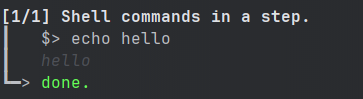
The shell method comes with the check_errors parameter, that you may want to set to False during uninstall phases,
and the timeout parameter, if required. self.shell also returns the entire shell output (stdout & stderr) as a
string, if you need it.
By default, when called with self.shell, shell commands outputs are only displayed to the user if the command fails
and if check_errors. You can force to always display shell command output.
Conditions
You may want to add install or uninstall conditions. In order to do this, implement the install_condition and
uninstall_condition methods of your install-step:
from install_process import InstallStep


class MyStepWithConditions(InstallStep):
    def install_condition(self) -> bool:
        """Always skip this install part."""
        return False

    def uninstall_condition(self) -> bool:
        """Always skip this uninstall part."""
        return False

    def install(self) -> None:
        """Show install conditions."""

    def uninstall(self) -> None:
        """Show uninstall conditions."""
Here is what the step looks like when it is run in install & uninstall mode:

Group of Install Steps
To make life easier when you have hundreds of install-steps, you may want to group some of them. You can define a group
of install-steps by overloading the InstallSteps class, and filling the `steps class attribute:
from install_process import InstallStep, InstallSteps


class Step1(InstallStep):
    def install(self) -> None:
        """Step 1"""
    def uninstall(self) -> None:
        """Step 1"""

class Step2(InstallStep):
    def install(self) -> None:
        """Step 2"""
    def uninstall(self) -> None:
        """Step 2"""

class Step3(InstallStep):
    def install(self) -> None:
        """Step 3"""
    def uninstall(self) -> None:
        """Step 3"""


class GroupOfSteps(InstallSteps):
    """Group of Step1 and Step2 and Step3"""
    steps = [
        Step1(),
        Step2(),
        Step3(),
    ]
Note that what is displayed at execution is the group class docstring (“””Group of Step1 and Step2 and Step3”””).
Just like with an install-step, you may implement the install_condition and uninstall_condition methods of your
group of install-step to add conditions.
You can add groups in groups:
# [...]


class AnotherGroup(InstallSteps):
    """Group of a group and some steps"""
    steps = [
        Step0(),
        GroupOfSteps(),
        Step4(),
        Step5(),
    ]
Install Process
Basics
The installation process requires you to define an InstallProcess. It groups all the install-steps you have defined,
and works like ann InstallSteps:
# [...]


class MyInstallProcess(InstallSteps):
    """MY INSTALLATION PROCESS"""
    steps = [
        Step0(),
        GroupOfSteps(),
        Step4(),
        Step5(),
    ]
Here is what the process looks like when it is run in install & uninstall mode:

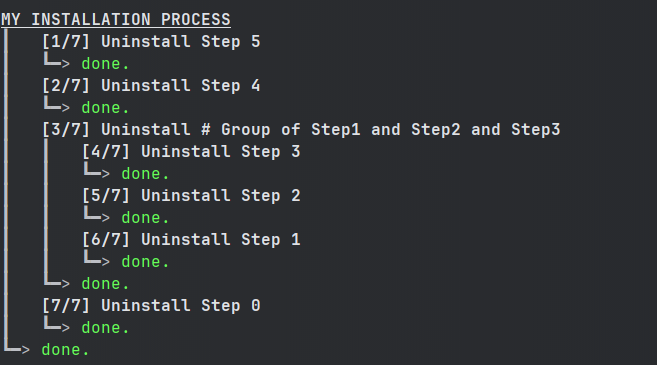
Running an installation process
If you want to know how to launch an installation process from a file, check the Install Process Command Line section.
# [...]

class MyInstallProcess(InstallSteps):
    #...

if __name__ == '__main__':
    MyInstallProcess().install()
Executing Only a Subset of the Installation Process
When instantiating your install process, you can give the name of the step (or group of steps) you want to launch. Only this step will be run.
# [...]

class MyInstallProcess(InstallSteps):
    #...

if __name__ == '__main__':
    MyInstallProcess('GroupOfSteps.Step2').install()
In the example above, only the install of Step2, in the GroupOfSteps, will be run.
Install Prologue & Epilogue
If you wish to add things before/after your installation/uninstallation, you may implement the prologue and
epilogue methods of your group of install-process. These will be executed even if you pass a step_name to your
install process (ref. Executing Only a Subset of the Installation Process).
Parallel Install Steps
You can execute install-steps or group of install steps concurrently (“in parallel”) if you wish:
# [...]

class ConcurrentsSteps(InstallSteps):
    """Steps"""
    steps = [
        Step0() | Step1() | Step2(),
        Step4(),
    ]
In above example, Step0 & Step1 & Step2 will be executed concurrently, then Step4.
Note that when a group of install-steps are executed in parallel, nothing will be displayed until all the steps of the group of install-steps are completed.